
- AceGamingPC
- Last Modified: 09/24/2025
Best CPU for RTX 5080 in 2025 - Top Processors for Gaming, Streaming & Content Creation
As an Amazon Associate, we earn from qualifying purchases made through the links on this page. Learn More.
Building a New PC? Here’s What You Need to Know!
Pair your RTX 5080 with the right CPU for peak performance in 2025. Whether you’re gaming in 4K, building a high-end creative workstation, or just want smooth frame rates with no bottlenecks, your processor plays a huge role. Here’s what to look for in 2025 and the best processors across budget, Intel, AMD, and creator categories.
The RTX 5080 is one of NVIDIA’s most powerful GPUs yet, offering serious performance gains for 4K gaming, creative work, and AI-enhanced workflows. But a GPU that is strong needs the right CPU to back it up. Pair it with something too weak, and you’ll leave performance on the table. Whether you’re gaming, streaming, editing, or doing all three, choosing the right CPU in 2025 matters more than ever.
This guide breaks down the best CPU and GPU pairings for RTX 5080 builds across every budget and use case, including the top options from Intel and AMD. We’ll also go over what to look for in a processor for RTX 5080 gaming, streaming, and AI-enhanced workflows, plus some real-world notes from actual PC builds in 2025.
Top CPU Picks at a Glance
Best CPU for RTX 5080 in 2025
Best Overall
Best Intel Option
Best AMD Option
Best Budget
Best for Creators
Recommended Ace Gaming PC Build With 9800X3D and RTX 5080
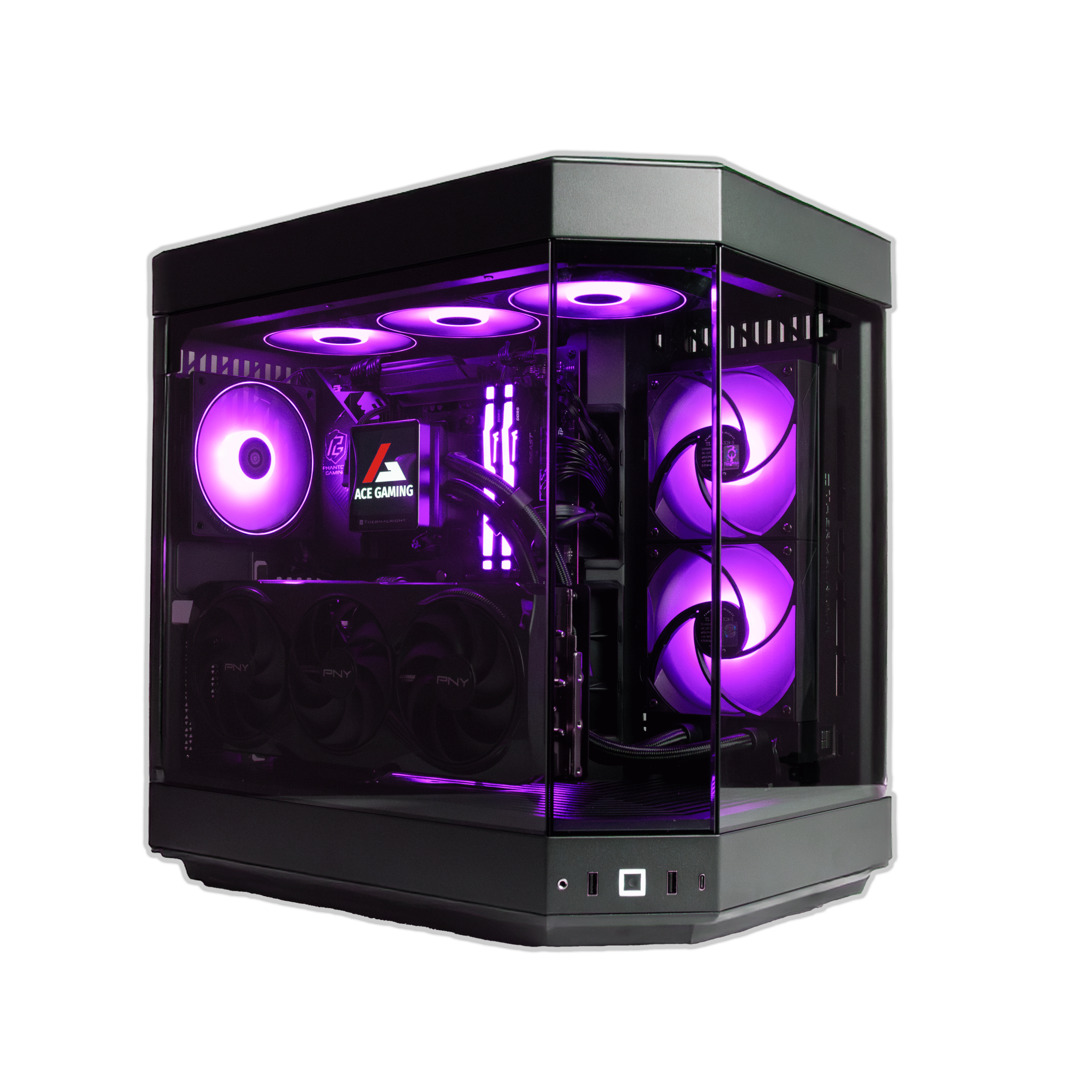
Firestorm Inferno
Mid-Tower
8 Reviews
$2,359
$1,899
Specifications:
- OS: Windows 11 Pro
- CPU: AMD Ryzen 7 9800X3D
- RAM: 32GB DDR5 RAM
- Storage: 2TB NVMe M.2
- GPU: NVIDIA RTX 5080
- PSU: 850W Power Supply
- We're currently out of stock due to overwhelming demand.
- Due to high demand, please allow 3–4 weeks for production and delivery.
What to Look for in a CPU for RTX 5080
When choosing a CPU for the RTX 5080, your goal is to avoid bottlenecks without overspending. Here are a few key things to consider:
- Core Count & Threading: For gaming, 8 to 12 cores is plenty. For content creation, go higher if your budget allows. The 5080 can handle serious multitasking, but it won’t fix a CPU that can’t keep up.
- Clock Speed: Faster base and boost clocks help drive high frame rates, especially in CPU-bound titles. Don’t chase the absolute highest numbers though — balance is key.
- 3D V-Cache (AMD-specific): AMD’s X3D chips offer noticeably better performance in some games. If you’re building a system focused on gaming, they’re hard to beat. I’ve seen the 9800X3D outperform pricier chips just by being more consistent under load.
- Platform Longevity: Consider upgrade paths. AM5 and LGA1700 both offer strong options, but AMD may give you more life, long-term.
Best Overall: AMD Ryzen 7 9800X3D
AMD Ryzen 7 9800X3D
best overall cpu for 5080
HYPE LEVEL:
Where To Buy:
The 9800X3D continues AMD’s dominance in gaming. With its stacked 3D V-Cache, it squeezes more performance out of titles that benefit from extra cache, especially competitive games where FPS matters. I’ve used this chip in a couple of 5080 builds, and honestly, it’s been as plug-and-play as it gets. It runs cool, boosts well, and avoids the unnecessary power draw you sometimes get from overbuilt chips.
| Feature | AMD Ryzen 7 9800X3D |
|---|---|
|
Cores/Threads: |
8 / 16 |
|
Base Clock: |
3.2 GHz |
|
Boost Clock: |
Up to 5.0 GHz |
|
Cache: |
96 MB (Including 3D V-Cache) |
|
TDP: |
120W |
|
Socket: |
AM5 |
|
Integrated Graphics: |
None |
Best Intel Option: Intel Core i9-14900K
Intel Core i9-14900K
best intel cpu for 5080
HYPE LEVEL:
Where To Buy:
The 14900K is Intel’s best option right now if you’re building around the RTX 5080 and want excellent performance across gaming and multitasking. It handles high refresh gaming, streaming, and editing without breaking a sweat. It runs hotter than the AMD options, though, so make sure you have a solid cooler.
| Feature | Intel Core i9-14900K |
|---|---|
|
Cores/Threads: |
24 (8 Performance + 16 Efficient) / 32 Threads |
|
Base Clock: |
3.2 GHz (P-Cores) |
|
Boost Clock: |
Up to 6.0 GHz |
|
Cache: |
36 MB L3 Cache |
|
TDP: |
125W (Base), Up to 253W Turbo |
|
Socket: |
LGA 1700 |
|
Integrated Graphics: |
Intel UHD Graphics 770 |
Best AMD Option: AMD Ryzen 9 9950X
AMD Ryzen 9 9950X
best amd cpu for 5080
HYPE LEVEL:
Where To Buy:
If you don’t need the 3D V-Cache but want AMD’s latest and greatest, the 9950X gives you 16 cores and strong boost clocks. It’s more balanced for creators who also game, rather than pure gamers. The chip is expensive, and most people won’t max it out unless they’re doing Blender or DaVinci work, but it’s future-proof and pairs well with the 5080 for any kind of task.
| Feature | AMD Ryzen 9 9950X |
|---|---|
|
Cores/Threads: |
16 / 32 |
|
Base Clock: |
3.5 GHz |
|
Boost Clock: |
Up to 5.7 GHz |
|
Cache: |
64 MB L3 Cache |
|
TDP: |
170W |
|
Socket: |
AM5 |
|
Integrated Graphics: |
None |
Best Budget: Intel Core i5-14600K
Intel Core i5-14600K
best budget cpu for 5080
HYPE LEVEL:
Where To Buy:
This is one of the few budget CPUs that still holds its own with a flagship GPU like the 5080. While it won’t keep up in every title at 4K, for most gamers playing at 1440p or using DLSS, the 14600K offers a great balance. It’s also surprisingly efficient. I used this in a test build and didn’t expect it to hold frame rates as well as it did, especially in esports titles.
| Feature | Intel Core i5-14600K |
|---|---|
|
Cores/Threads: |
14 (6 Performance + 8 Efficient) / 20 Threads |
|
Base Clock: |
3.5 GHz (P-Cores) |
|
Boost Clock: |
Up to 4.9 GHz |
|
Cache: |
24 MB L3 Cache |
|
TDP: |
75W (Base), Up to 181W Turbo |
|
Socket: |
LGA 1700 |
|
Integrated Graphics: |
Intel UHD Graphics 730 |
Best for Creators: AMD Ryzen 9 7950X
AMD Ryzen 9 7950X
best content creator cpu for 5080
HYPE LEVEL:
Where To Buy:
For content creation, rendering, 3D modeling, and heavy streaming, the 7950X is still a strong pick. It’s a bit cheaper now compared to launch, which makes it a better value today. The 5080’s acceleration in creative apps really shines when the CPU isn’t the bottleneck, and this chip ensures it isn’t.
| Feature | AMD Ryzen 9 7950X |
|---|---|
|
Cores/Threads: |
16 / 32 |
|
Base Clock: |
4.5 GHz |
|
Boost Clock: |
Up to 5.7 GHz |
|
Cache: |
64 MB L3 Cache |
|
TDP: |
170W |
|
Socket: |
AM5 |
|
Integrated Graphics: |
AMD RDNA 2 Graphics |
4 Recommended System Build Combos
If you’re planning a full build, here are a few suggested CPU + RTX 5080 combos with extra component options that offer great balance.
Gaming First: AMD Ryzen 9 9800X3D + RTX 5080
Ideal for competitive and high-FPS gaming. Add 32GB DDR5 and an X670E board for a future-ready setup.
Hybrid Use (Gaming + Content): Intel i9-14900K + RTX 5080
Solid for 1440p/4K gaming, editing, streaming, and AI-assisted tools. Consider Z790 boards with Wi-Fi 7 support.
Budget-Conscious Build: Intel i5-14600K + RTX 5080
Great if you’re reusing components or want to allocate more of your budget to the GPU.
Creator Workstation: AMD Ryzen 9 7950X + RTX 5080
Ideal for Adobe Suite, Blender, Unreal Engine workflows. Use high-speed storage and at least 64GB RAM if you can.
Final Thoughts
The RTX 5080 is a top-tier GPU that demands a balanced system to get the most from it. While there are several excellent CPU options in 2025, it really comes down to how you use your system. If you’re a pure gamer, go with the 9800X3D. If you’re building a multi-purpose rig, the 14900K or 9950X will give you headroom for everything else. And if you’re trying to stretch the budget, the 14600K proves you don’t always need a flagship CPU to enjoy next-gen performance.
We’ve tested a lot of builds with the 5080 lately, and the pairing really does matter. The good news is, there’s no shortage of great options.
Best CPU for RTX 5080 - FAQs
Do I need a high-end CPU to use the RTX 5080 effectively?
Not necessarily but pairing it with a weaker CPU will limit its performance. You’ll want something that can keep up with both single-thread and multi-thread tasks, especially at 1440p or 1080p.
Will the RTX 5080 bottleneck with older CPUs like the Ryzen 5000 series?
Some of them, yes, especially if you’re running something like a 5600X. You’ll start to see frame rate drops in CPU-bound titles. Upgrading to a newer platform can make a noticeable difference.
Is Intel or AMD better for RTX 5080 gaming builds in 2025?
Both work great, honestly. Intel’s 14th-gen chips tend to edge ahead in some esports and lightly threaded games, while AMD’s X3D lineup is hard to beat for overall gaming efficiency.
Should I go for a CPU with integrated graphics?
You don’t need one if you’re using a dedicated GPU like the 5080. That said, it can be handy for troubleshooting or temporary use without the GPU installed.
Is DDR5 memory a must for the best performance with the RTX 5080?
It’s not mandatory, but DDR5 offers better bandwidth and future-proofing. Most high-end motherboards that support the best CPUs also support DDR5 anyway, so it’s usually part of the package.
How many cores should my CPU have for gaming with the RTX 5080?
At least 8. More cores won’t hurt, especially for streaming or multitasking, but a solid 8-core chip with strong single-core performance is the sweet spot for most gamers.
What’s the best resolution to take advantage of the RTX 5080?
1440p and 4K. If you’re gaming at 1080p, the GPU will often be waiting on your CPU – which is why CPU choice becomes even more important at lower resolutions.
Should I upgrade my motherboard when upgrading my CPU for the RTX 5080?
Most likely, yes. Especially if you’re moving to a new platform like AM5 or LGA 1700. Newer motherboards also come with better power delivery and support for faster memory and storage options.
Note: This page is updated frequently as we continue researching and reviewing products throughout the year. The opinions and recommendations provided on this page are based on extensive online research and available product information. While we aim to provide accurate and helpful insights, it’s important to note that everyone’s needs and preferences are different. What we believe may be a good option for some may not be the best choice for others. We always encourage you to do your own research and consider your unique needs before making any purchase decisions.
- CATEGORIES
- TOP ARTICLES


Step-by-Step Guide To Become A Successful Streamer In 2025
AceGamingPC
November 18, 2024
Read More »

340 Howard Ave.
Des Plaines, IL 60018
Phone: 847-952-6999
Email Us